Stop copy-pasting your data filter: build a reusable Kamelet in Kaoto


What you’ll learn
- Why the Content Filter pattern belongs in a reusable Kamelet, not copy-pasted route steps
- How a multi-route Camel file makes the sensitive data leak obvious before you fix it
- How to build a custom action Kamelet in Kaoto with an
allowlistproperty - How each route configures its own allowlist in the step form — without duplicating filter logic
The problem: when your data filter lives in two places, it breaks in one
Imagine a shipping integration. Orders arrive with everything fulfillment needs: customer name, email, address, SKU, amount. Downstream you also feed analytics and an external partner (for example a carrier status API). Those consumers must not see personally identifiable information (PII) — things like a customer’s name, email address, or physical address.
Someone adds a few Camel steps on the analytics route to keep only safe fields. It works — until the partner export needs the same rule. Then someone pastes the steps again. Then a field is renamed (customer_name becomes first_name and last_name). Then one route is updated and the other isn’t. The “policy” was never a policy; it was a snippet.
That snippet is the Content Filter pattern: remove data from a message so the receiver only sees what it should. The filter is company policy. Policy is exactly what you want as a reusable building block.
Apache Camel already has that building block: Kamelets. Kaoto makes the last mile pleasant — create the Kamelet in the editor, save it into the workspace, and the tile shows up in the catalog so you can wire it into routes visually.
What we’re building
A four-route integration in one YAML file that fans an incoming order out to fulfillment, analytics, and a partner export:
| Route | Role | Should see PII? |
|---|---|---|
order-ingest | Creates a sample order and fans out | Yes (source of truth) |
order-fulfillment | Warehouse / ops — needs contact data | Yes |
order-analytics | Internal metrics — must not see PII | No |
order-partner-export | Carrier / partner feed — must not see PII | No |
The build goes in three steps:
- Start with all four routes without a filter (analytics and partner-export still log everything — the bug is visible).
- Build a custom
content-filter-actionKamelet in Kaoto with oneallowlistproperty. - Place that Kamelet on analytics and partner-export, then set a different allowlist on each route.
Step 1: Four routes, one file (no filter yet)
Create orders.camel.yaml (or any *.camel.yaml file Kaoto recognises). Paste the YAML below as-is from the View YAML tab. Notice on the Image Preview tab that analytics and partner-export do not call a Kamelet yet — they log the full body, including PII.
What you should see when it runs (before the fix)
Fulfillment correctly has identity fields, Analytics and partner-export incorrectly have the same full payload:
That’s the teachable moment: two different consumers (metrics vs partner API), one shared mistake — no Content Filter yet.
Step 2: Build the custom Content Filter Kamelet in Kaoto
You’re not going to paste a hard-coded allowlist into every route, and you’re not going to clone setBody JSON on each route either. Instead, you’ll create the Kamelet once in Kaoto:
- Create a new Kamelet by clicking on New File in Kaoto view(perspective) integrations nav bar, set the name to
content-filter-actionand the type to action — not source (which produces messages) or sink (which consumes them), but action, because this Kamelet sits between existing steps in a route and transforms the message in place. - Add a single property:
allowlist(string) — one control that each route will configure independently. - Give it a sensible default: the company baseline of safe shipping fields (no customer identity).
- On the Kamelet canvas, wire
kamelet:source→unmarshalJSON →setBodyto keep only the fields named in{{allowlist}}→marshalJSON. - Save the Kamelet into the workspace (for example
content-filter-action.kamelet.yaml). No IDE restart needed.
Reference YAML
Use this as a check against Source Code view after building in Kaoto — or paste the code from the YAML Source directly if you’re skipping the visual designer:
Save if you edited source. Workspace Kamelets are picked up automatically when Kaoto refreshes the catalog tiles.
Alternative: one boolean property per field
If you’d rather give teams explicit toggles in the form (one checkbox per field), define properties such as includeOrderId, includeAmount, … (type: boolean, defaults true) and branch in Groovy with if ({{includeOrderId}}) out.put('order_id', src['order_id']).
That approach makes it harder to accidentally request a PII field by typo, but it needs heavier logic to process all seven boolean properties. For this post we stick with a single allowlist string.
Step 3: Wire the policy into your routes
This is the step that turns a Camel feature into a team practice.
Open the integration in Kaoto
Open orders.camel.yaml in VS Code with the Kaoto extension. You should see all four routes on the canvas.
Find the Kamelet in the catalog — no catalog rebuild needed
- Confirm
content-filter-action.kamelet.yamlis saved in the workspace. - On the order-analytics route, open the catalog (add step before the log).
- Switch to the Kamelets tab and search for
content-filterorContent Filter.
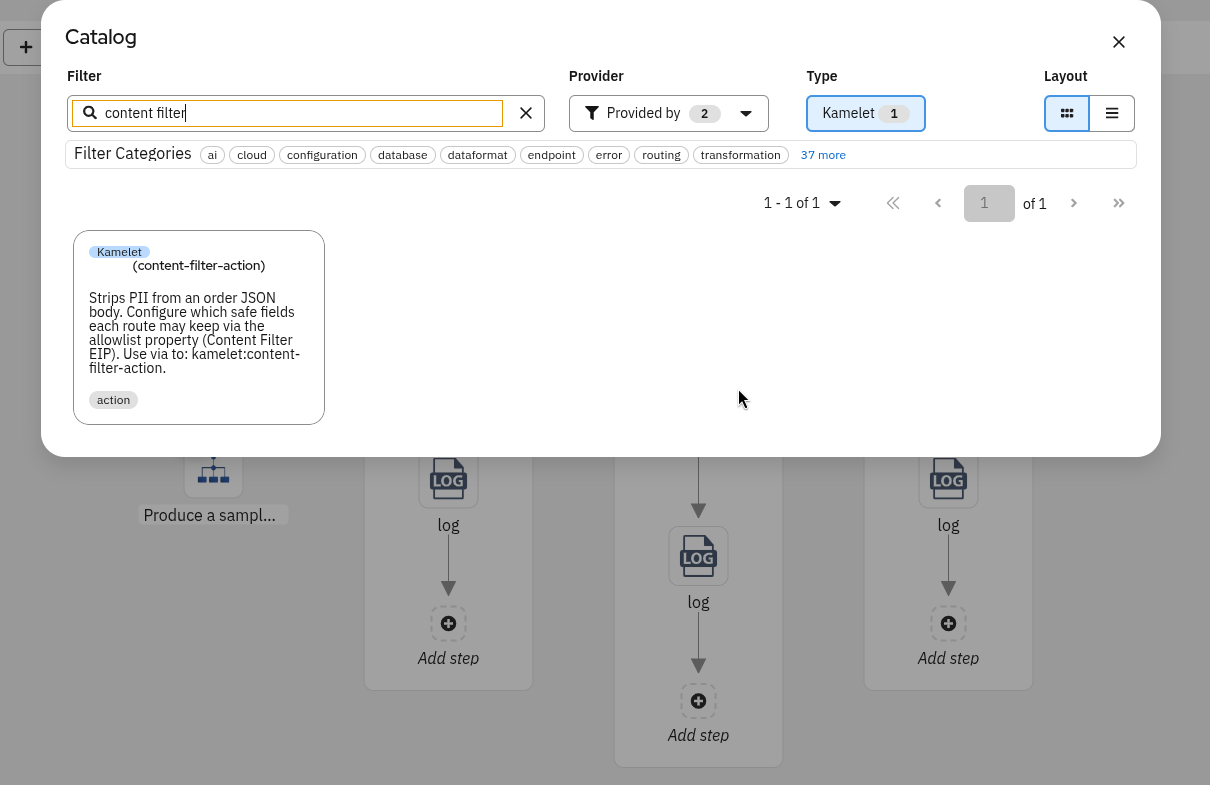
Content Filter Kamelet tile on the catalog modal
Expected: The tile appears without regenerating a Camel catalog archive. Workspace Kamelets are merged in automatically when Kaoto refreshes its catalog tiles.
Apply it where PII must not leave
Fulfillment stays as a plain log step — ops still need contact data.
Analytics and partner-export each get the same Kamelet tile inserted before their log step. The difference is the allowlist value you set on each:
- Insert Content Filter on
order-analytics. - Open the step’s configuration form — you’ll see a single Fields to keep /
allowlistcontrol. - Leave analytics on the default (full safe set), or edit the comma-separated list as needed.
- Insert Content Filter on
order-partner-export. - On that step’s form, set a narrower allowlist — for example, drop
amountandshipping_priority.
You’re editing the allowlist per route usage, through the Kamelet parameter — not by duplicating filter YAML into each route.
After wiring, the source looks like this:
- route:
    id: order-analytics
    description: Analytics
    from:
      uri: direct:analytics
      steps:
        - to:
            uri: kamelet:content-filter-action
            id: to-4189
        - log:
            loggingLevel: INFO
            message: "ANALYTICS: ${body}"
- route:
    id: order-partner-export
    description: Partner
    from:
      uri: direct:partner-export
      steps:
        - to:
            uri: kamelet:content-filter-action
            id: content-filter-kamelet-on-order-partner-export
            parameters:
              allowlist: order_id,item_sku,quantity,destination_country,status
        - log:
            loggingLevel: INFO
            message: "PARTNER-EXPORT: ${body}"
Same tile, two allowlist values. Fulfillment still has no filter.
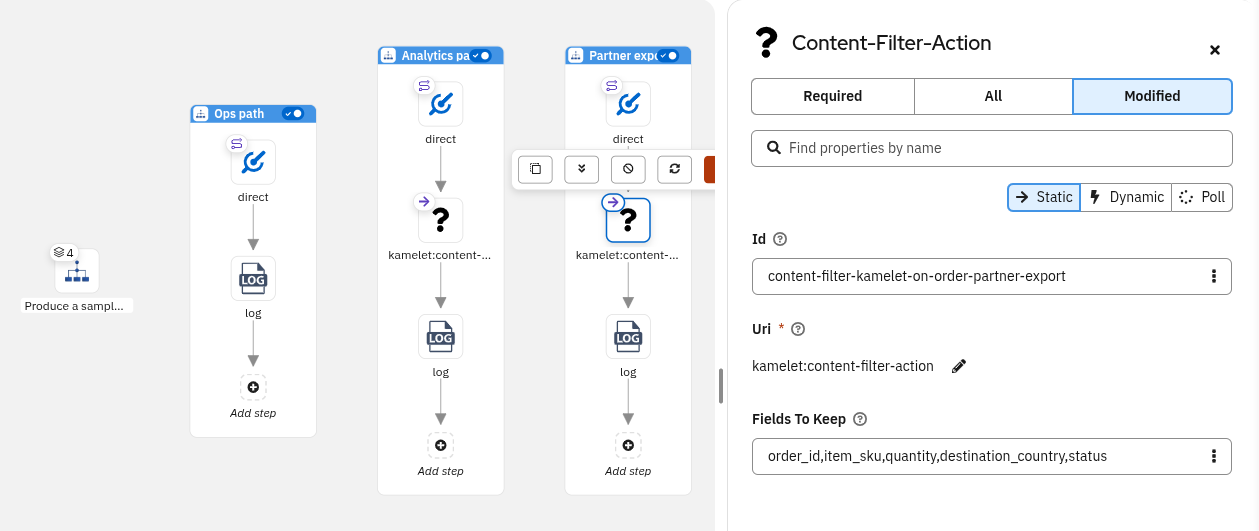
Config form (Modified tab) of the Content Filter node on the order-partner-export route
What you should see after the fix
Partner-export has no amount or shipping_priority — configured on that step only. The analytics route uses the same Kamelet but with a different allowlist configured.
Two ways to change policy
| Change | Where | Effect |
|---|---|---|
| Per-route allowlist | Kaoto form / parameters.allowlist on that to: kamelet:... step | Only that consumer’s field set changes |
| Baseline default | Kamelet definition properties.allowlist.default | What every new usage starts with before you edit the form |
To change what one consumer receives, edit that step’s allowlist in Kaoto. To change the starting default for all new usages, update the property default in the Kamelet editor, save, and re-open the step form.
Takeaways
- Show the leak first — a multi-route file makes it obvious that analytics and partner-export share the same problem.
- Build the Content Filter as a Kamelet of type
action— actions sit mid-route and transform the message, which is exactly what a filter does. One template, many call sites, zero duplication. - Kaoto closes the loop — save the Kamelet → catalog tile appears → drop it onto routes → edit each
allowlistin the form. - Keep PII out of allowlists by convention — the property description and code review are your guardrails.
The same approach works beyond data filtering. Anywhere you catch yourself copy-pasting the same transformation, enrichment, or validation logic across routes — currency conversion, audit stamping, schema validation, payload size trimming — a custom action Kamelet is the right fix. Define the logic once, expose the variable parts as properties, and let each route configure its own values through the Kaoto form.
Further reading
- Enterprise Integration Patterns — Content Filter
- Apache Camel Kamelets
- Kaoto documentation
Let’s build it together
Let us know what you think by joining us in the GitHub discussions. Do you have an idea for improving Kaoto’s Kamelet support? Would you love to see a useful feature implemented or simply ask a question? Please create an issue.
Give it a try
- Kaoto online editor
- Kaoto is available as a VS Code extension
Happy integrating! 🚀
