Code-First Approach
Introduction
The code-first approach uses Kaoto’s REST Import Wizard to import OpenAPI specifications and automatically generate REST endpoints with route stubs. Unlike the API-first approach (which links the spec at runtime), the wizard creates explicit endpoint definitions in your route file. Once generated, the OpenAPI file is no longer needed - all endpoints are defined in your route file. You then implement the route logic visually using Kaoto’s component catalog and Design view.
Import OpenAPI Specification with Kaoto
Step 1: Configure in the REST Import Wizard
- In the Kaoto extension, click in Import next to OpenAPI and it will open the REST Import Wizard.
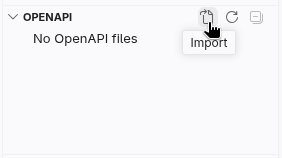
Kaoto’s REST Import Wizard button
In the Kaoto Import Wizard, select Upload file as the source
Click Choose file and select the
book-summary-api.openapi.yamlfileThe wizard will parse the file and show all discovered operations

Kaoto parses the OpenAPI file and shows operations
You should see the GET /books/{id}/fun-extract operation listed.
- Configure the following options (both should be checked):
- ☑ Create REST DSL operations - Generates REST endpoint definitions
- ☑ Create routes with direct endpoints - Generates route stubs for each operation

Configure REST DSL and route generation options
- Choose the folder to save the information and then give a name to the route.

Configure how Kaoto generates the routes
Step 2: Review Generated Structure in Kaoto
After importing, Kaoto generates and displays in the Design view:
- REST DSL definition - Complete endpoint with parameters and responses
- Direct route stub - A placeholder route ready for implementation
The generated structure looks like this:

Your route file now contains the REST endpoint definition, and the direct route stub.
Implement the Route Visually in Kaoto
Now you’ll implement the logic by reusing the route from the API-first approach and adding OpenAI integration.
This section assumes you’ve completed the API-First Approach documentation example. If not, complete that first or refer to it for the Gutenberg API integration steps.
Step 3: Copy Route from API-First Implementation
- Open the route file from the API-first documentation example (e.g.,
book-api.camel.yaml) - In Kaoto’s Design view, locate the
route-getBookFunExtractroute - Right-click on the route (not on individual steps) and select Copy
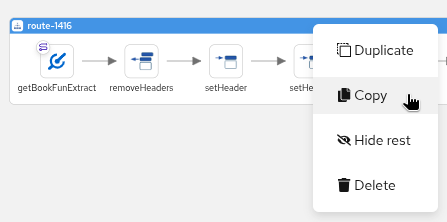
Copy the complete route from API-first implementation
Step 4: Paste Route into Code-First Route
- Switch back to your code-first route file
- In the Design view, find the
route-getBookFunExtractroute - Right-click on the Design canvas itself (not on the setBody step) and select Paste. This pastes the complete route from the API-first route.
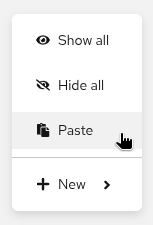
Paste the complete route into the code-first route file
Step 5: Drag and Drop Steps to Reorder
- In the Design view, locate the
removeHeadersstep - Click and drag the
removeHeadersstep - Drop it directly after the
directcomponent (at the beginning of the route) - Do the same with the other components.
The new route structure after drag and drop:

Step 6: Delete Placeholder and Extra Steps
- Delete the placeholder
setBodystep at the end (the one with “Operation getBookFunExtract not yet implemented”) - Delete any remaining copied
directcomponent
Your route now has the complete Gutenberg API integration in the correct order.
Step 7: Add OpenAI Integration from Catalog
Now add the AI-powered fun extract generation:
- Hover over the arrow after the
setBodystep (the one that extracts$.results[0].summary) - Click the + button that appears
- In the catalog search, type
openai - Select OpenAI component
- Configure in Kaoto’s form:
| Property | Value |
|---|---|
| Operation | chat-completion |
| Api Key | OLLAMA-LOCAL-KEY |
| Base Url | http://localhost:11434/v1 |
| Model | granite4:tiny-h |
| System Message | Summarize this text into a couple of short sentences and give it a funny twist |
This sends the book summary to your local Ollama instance running the Granite 4 model for AI-powered fun extracts.
For more details on configuring OpenAI in Kaoto, refer to the Quickstart guide.
The OpenAI component is now inserted between setBody and log, completing your route.
Complete Route
Your final route should look like this:

Testing in Kaoto
Run the Integration
- Make sure Ollama is running with the Granite 4 model
- In Kaoto’s toolbar, click the Run button. Make sure your application.properties and the new route are in the same folder.
- Kaoto will start your integration using JBang
- Watch the Design view to see your routes activate
Test the Endpoint
Open a terminal and run:
curl http://localhost:8080/books/1342/fun-extract
You should receive an AI-generated fun extract of “Pride and Prejudice” (book ID 1342).
Try Different Books
# Frankenstein
curl http://localhost:8080/books/84/fun-extract

# The Adventures of Sherlock Holmes
curl http://localhost:8080/books/1661/fun-extract
Each request will return a unique AI-generated fun extract!
Key Concepts
Apache Camel REST DSL
The REST DSL in Apache Camel provides a declarative way to define REST APIs. It allows you to specify REST endpoints, their operations, parameters, and responses in a structured format.
Learn more about Apache Camel REST DSL
Kaoto REST Import Wizard
Kaoto’s REST Import Wizard automates:
- Parsing OpenAPI specifications
- Generating explicit REST DSL endpoint definitions (not just linking)
- Creating direct route stubs ready for implementation
Unlike API-first (which links the spec at runtime), the wizard creates the actual endpoint definitions in your route file. Once generated, the OpenAPI file is no longer needed.
Learn more about OpenAPI and Camel
Direct Component
The Direct component provides synchronous, in-memory communication between routes, allowing you to separate REST endpoint definitions from their implementation logic.
Learn more about Camel Direct Component
Combining Multiple APIs
This documentation example demonstrates combining two external APIs:
- Project Gutenberg API (via RapidAPI) - Fetches book data
- OpenAI API (via Ollama) - Generates AI summaries
Camel makes it easy to orchestrate multiple services in a single route.
Summary
This documentation demonstrated:
- ✅ Using Kaoto’s REST Import Wizard to generate REST endpoints from OpenAPI (no runtime dependency on OpenAPI file)
- ✅ Building a route visually using Kaoto’s Design and component catalog
- ✅ Configuring components using Kaoto’s forms
- ✅ Connecting to external APIs (Gutenberg and OpenAI) visually
- ✅ Running and testing the integration using Kaoto’s tools
Next Steps
- Extending with REST Editor - Learn how to add new endpoints from scratch using the REST Editor