Extending with REST Editor
Introduction
Kaoto’s REST Editor provides a visual tree-based interface for creating and managing REST endpoints from scratch in your Camel integrations. Unlike the code-first approach (which generates endpoints from OpenAPI) or API-first (which links a spec at runtime), the REST Editor lets you manually create, configure, and manage individual endpoints through a visual interface without any OpenAPI specification. This approach is ideal for building REST APIs from scratch, extending existing REST APIs, and maintaining your API structure over time.
Starting Point
This example extends the REST API from the Code-First Approach. You can either:
- Continue from your existing route file, or
- Copy the final route from that documentation
Open Kaoto’s REST Editor
Step 1: Open Your Route File in Kaoto
- In VS Code, open the route file from Part 2 (e.g.,
rest-api.camel.yaml) - Kaoto will automatically open, showing the Canvas view
Step 2: Access the REST Editor
- In the Kaoto toolbar, click the REST DSL button
- Kaoto’s REST Editor will open, displaying your REST structure in a tree view

Kaoto’s REST Editor shows your API structure in a tree
You should see in the tree:
- Your REST service
- The existing
GET /books/{id}/fun-extractendpoint - The associated direct route
Add a New Endpoint Using Kaoto’s REST Editor
Now you’ll use Kaoto’s REST Editor to add a new endpoint for searching popular books.
Step 1: Add the GET Operation
Since the new endpoint shares the same base path (/books), we’ll add it to the existing REST block.
When to Create a New REST Block
Create a new REST block (using Actions > Add REST at the top level) when you need:
- A different base path (e.g.,
/authorsinstead of/books) - To organize endpoints by domain or feature area
For this example, both endpoints use /books/* paths, so we add the operation to the existing REST block.
- In the REST block in the tree, click Actions
- Select Add Operation
- In Kaoto’s modal dialog, configure:
| Property | Value |
|---|---|
| HTTP Method | GET |
| Path | /books/popular |
| Operation ID | listBooks |
Click Add to create the operation in the tree.
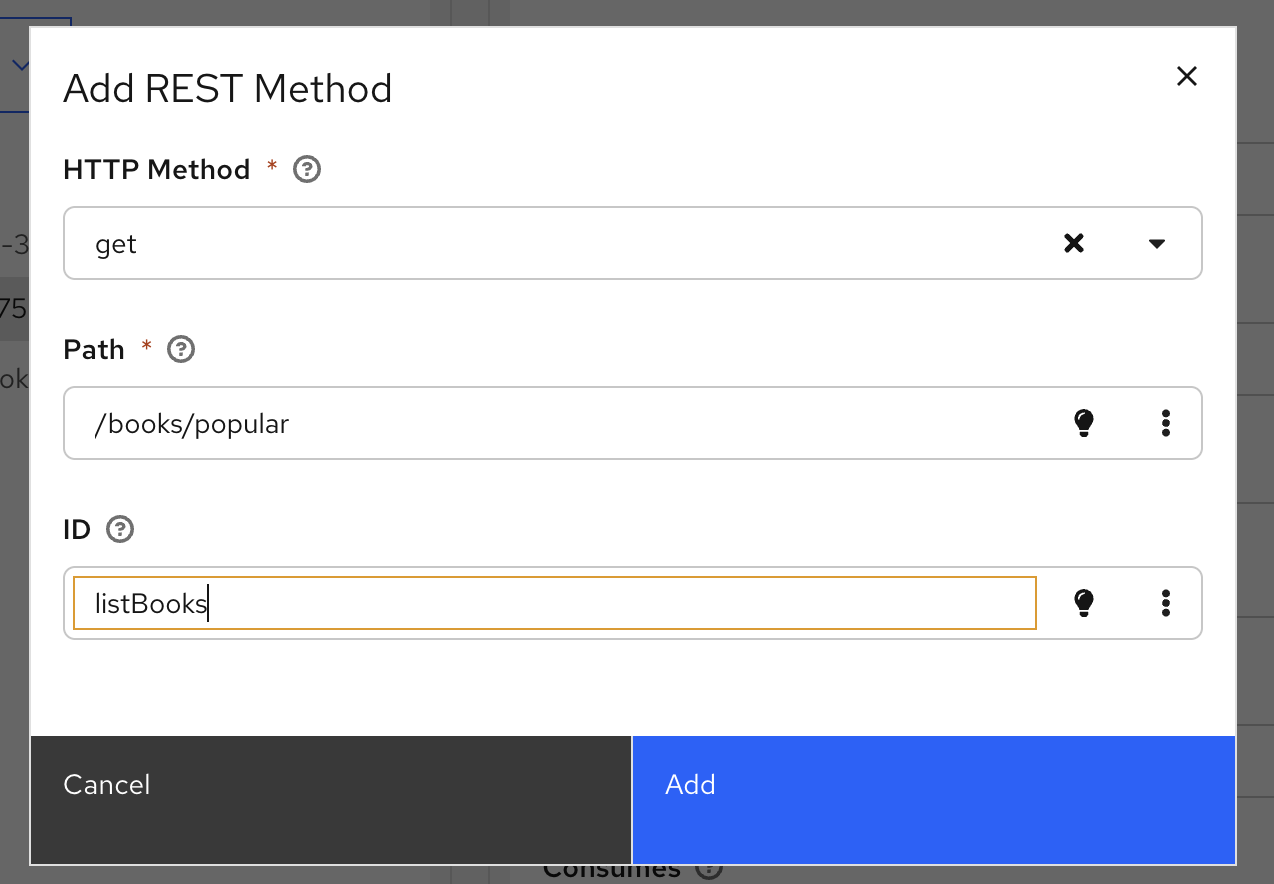
Configure the new GET operation in Kaoto’s modal
Step 2: Configure the Operation in Kaoto’s Form
With the new operation selected in the tree, configure its properties using Kaoto’s form:
| Property | Value |
|---|---|
| Produces | application/json |
| Description | Lists popular books from Project Gutenberg |
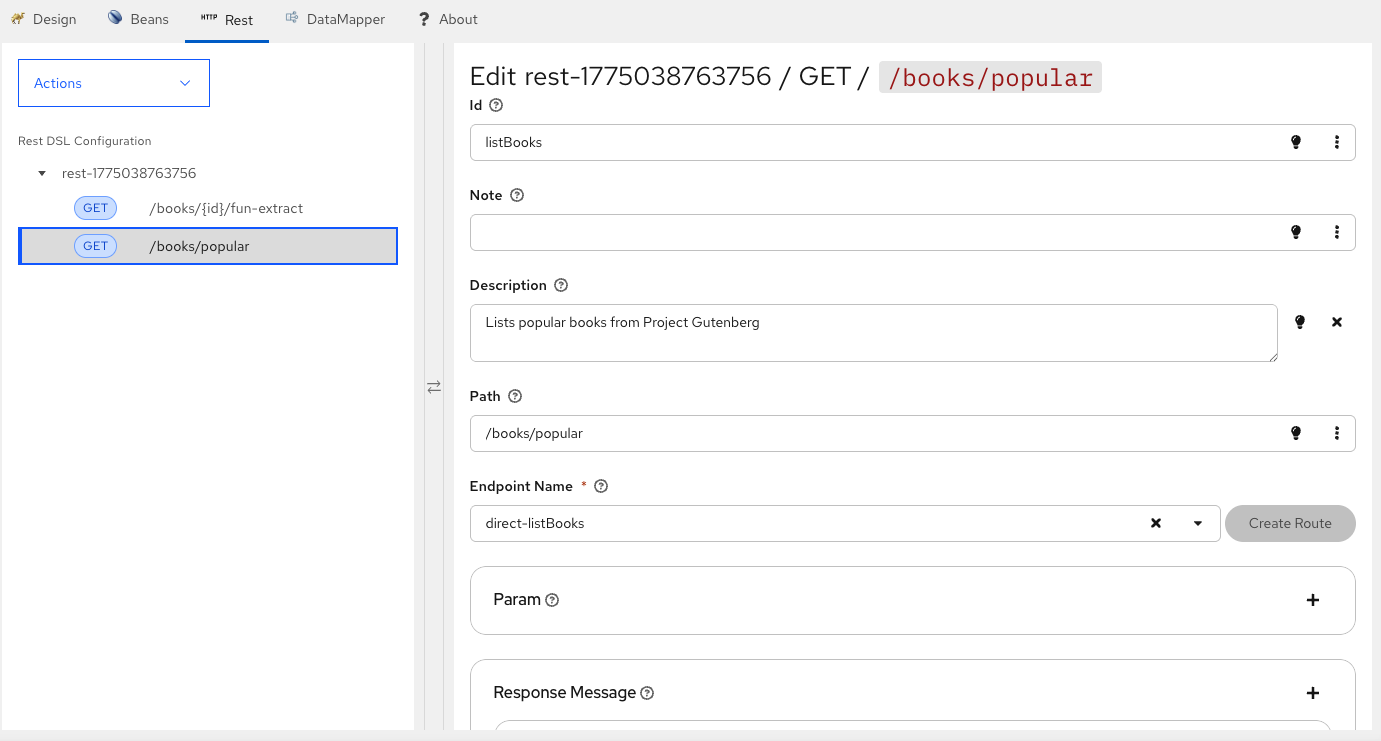
Configure operation properties in Kaoto’s form
Step 3: Add Response Messages Using the Form
Scroll down in Kaoto’s configuration form and add response messages:
Click + next to Response Message
Configure the first response in the form:
- Code: 200
- Message: Books retrieved successfully
- Content Type: application/json
Add a new response again
Configure the error response:
- Code: 500
- Message: Server error during processing
Current state of the route file:
- rest:
    id: rest-1775038763756
    get:
      - id: getBookFunExtract
        path: /books/{id}/fun-extract
        routeId: route-getBookFunExtract
        to: direct:getBookFunExtract
        description: Fetches a book from Project Gutenberg and generates an AI extract
          using OpenAI
        produces: application/json
        param:
          - name: id
            type: path
            required: true
            description: Project Gutenberg book ID (e.g., 11 for Alice's Adventures in
              Wonderland)
            dataType: integer
        responseMessage:
          - code: "200"
            message: Book fun extract generated successfully
            contentType: application/json
          - code: "404"
            message: Book not found in Project Gutenberg
          - code: "500"
            message: Server error during processing
      - id: listBooks
        path: /books/popular
        to:
          uri: direct
          parameters:
            name: direct-listBooks
        produces: application/json
        description: Lists popular books from Project Gutenberg
        responseMessage:
          - message: Server error during processing
            code: "500"
          - message: Books retrieved successfully
            code: "200"
            contentType: application/json
- route:
    id: route-getBookFunExtract
    from:
      uri: direct:getBookFunExtract
      id: direct-from-getBookFunExtract
      steps:
        - removeHeaders:
            id: removeHeaders-4268-1881
            pattern: CamelHttp*
        - setHeader:
            id: setHeader-3265-3267
            name: x-rapidapi-host
            constant:
              expression: project-gutenberg-free-books-api1.p.rapidapi.com
        - setHeader:
            id: setHeader-2139-3021
            simple:
              expression: "{{gutenberg.api.key}}"
            name: x-rapidapi-key
        - toD:
            id: toD-4177-4046
            uri: https://project-gutenberg-free-books-api1.p.rapidapi.com/books/${header.id}?bridgeEndpoint=true
            parameters: {}
        - setBody:
            id: setBody-2130-2169
            jsonpath:
              expression: $.results[0].summary
        - to:
            id: to-3162
            uri: openai
            parameters:
              operation: chat-completion
              apiKey: OLLAMA-LOCAL-KEY
              baseUrl: http://localhost:11434/v1
              model: granite4:tiny-h
              systemMessage: Summarize this text into a couple of short sentences and give it
                a funny twist
        - log:
            message: '"Book summary: ${body}"'
Step 4: Create the Direct Route
- Next to Endpoint Name in Kaoto’s form, you’ll see a Create Route button
- Click Create Route
- Kaoto will generate a new direct route stub for
direct:listBooksand show it in the Canvas
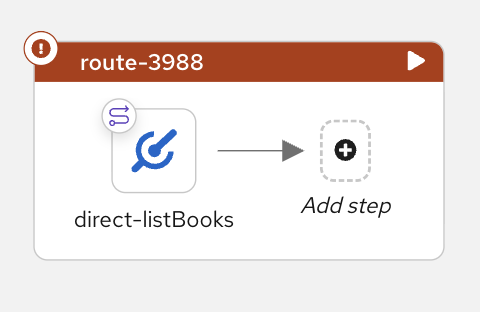
Kaoto generates a direct route stub ready for implementation
Implement the Popular Books Route in Kaoto
Now you’ll implement the logic using Kaoto’s Canvas view.
Step 1: Navigate to the New Route in Canvas
- In Kaoto’s Canvas view, find the
route-listBooksroute - You’ll see it starts with a
directcomponent
Step 2: Reuse Steps from the Existing Route
Since both routes call the same RapidAPI service, you can duplicate the common steps from the existing route:
- Navigate to the
route-getBookFunExtractroute in Canvas - Select the
removeHeadersstep - Right-click over the component and select Duplicate
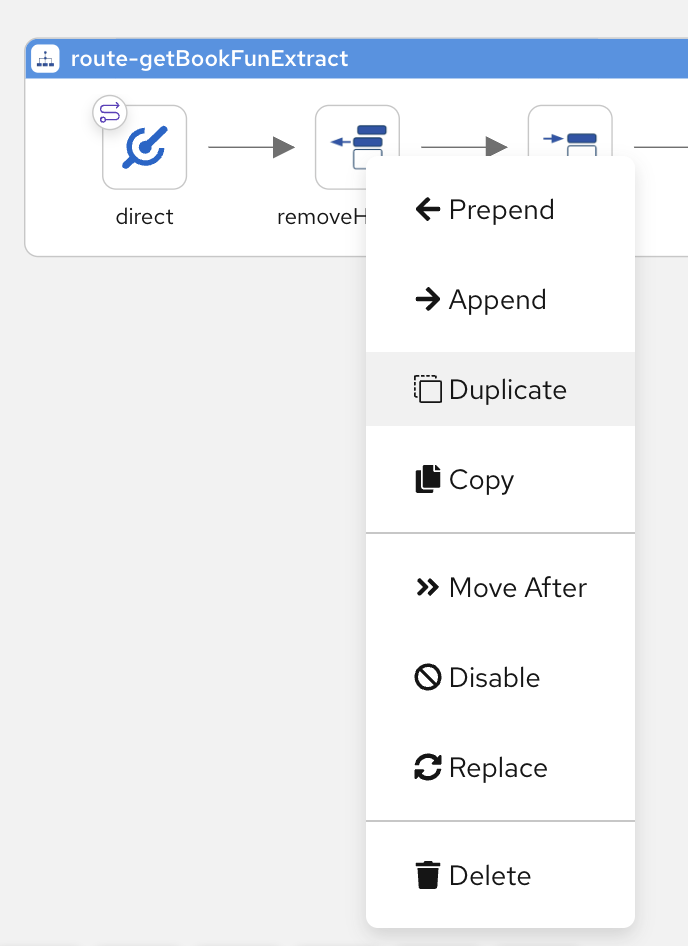
Right-click on a component to duplicate it
- Drag the duplicated step to the
route-listBooksroute and drop it after thedirectcomponent - Repeat for both
setHeadersteps (x-rapidapi-host and x-rapidapi-key)
This approach saves time by reusing the exact configuration from the working route.
Step 3: Add HTTP Call from Catalog
- Click Add step in the Canvas
- Search for
toin the catalog (nottoD- we don’t need dynamic URI here) - Select To
- Configure: URI =
https://project-gutenberg-free-books-api1.p.rapidapi.com/books?bridgeEndpoint=true
This calls the Gutenberg API to get a list of popular books.
Step 4: Extract Book Information
- Click Add step in the Canvas
- Search for
setBodyin the catalog - Select Set Body
- Configure:
- Expression Type: JSONPath
- Expression:
$.results[*].['title', 'authors']
This extracts just the title and authors from each book in the response.
Step 5: Format as Pretty JSON
- Click Add step in the Canvas
- Search for
marshalin the catalog - Select Marshal
- Select JSON as the data format
- Enable Pretty Print:
true
This formats the response as readable JSON.
Step 6: Add Logging
- Click Add step in the Canvas
- Search for
login the catalog - Select Logger
- Configure: Message =
Books list: ${body}
Complete Route
Your final route file should now have one REST block with two operations and two routes:

Testing the New Endpoint
Run the Integration
- Ensure your
application.propertiesfile has your RapidAPI key - In Kaoto, click the Run: folder button in the folder
- Kaoto will start your integration using JBang
Test the Popular Books Endpoint
curl http://localhost:8080/books/popular
You should receive a JSON array with popular books, showing their titles and authors:
[
  {
    "title": "Frankenstein; or, the modern prometheus",
    "authors": [
      {
        "id": 3761,
        "name": "Shelley, Mary Wollstonecraft"
      }
    ]
  },
  {
    "title": "The City of God, Volume I",
    "authors": [
      {
        "id": 18428,
        "name": "Augustine, Saint, Bishop of Hippo"
      },
      {
        "id": 1101993,
        "name": "Augustine, of Hippo, Saint"
      }
    ]
  },
  {
    "title": "Wuthering Heights",
    "authors": [
      {
        "id": 151,
        "name": "Brontë, Emily"
      }
    ]
  }
  // ... more books
]
Key Concepts
Apache Camel REST DSL
The REST DSL (Domain Specific Language) in Apache Camel provides a declarative way to define REST APIs. It allows you to specify REST endpoints, their operations, parameters, and responses in a structured format that Camel uses to expose HTTP endpoints.
Key characteristics:
- Declarative API definition separate from implementation logic
- Automatic HTTP endpoint generation
- Support for multiple REST components (platform-http, netty-http, servlet, etc.)
- Integration with OpenAPI specifications
Learn more about Apache Camel REST DSL
Kaoto REST Editor
Kaoto’s REST Editor provides:
- Tree view of your complete REST API structure
- Visual endpoint management - add/edit/delete operations without YAML
- Configuration forms with validation and documentation
- Quick actions for adding operations and generating routes
- Real-time sync with Canvas and Code views
Direct Component
The Direct component in Apache Camel provides direct, synchronous invocation of routes. It’s commonly used to separate REST endpoint definitions from their implementation logic, allowing routes to be reusable and testable.
Key characteristics:
- Synchronous, in-memory communication between routes
- No network overhead
- Ideal for internal route-to-route communication
- Supports request-reply pattern
Learn more about Camel Direct Component
Adding Operations to Existing REST Blocks
When extending an API, you can add operations to existing REST blocks:
- Operations within the same REST block share configuration
- Use the same REST block for related endpoints (e.g., all
/books/*paths) - This keeps your API structure organized and maintainable
However, create separate REST blocks when you need different base paths, different configurations, or want to organize endpoints by distinct domains (e.g., /books vs /authors).
JSONPath for Data Transformation
JSONPath is a query language for JSON, similar to XPath for XML. In Camel, the JSONPath language allows you to extract and transform data from JSON messages.
Key capabilities:
- Extract specific fields from JSON responses
- Transform nested data structures
- Select multiple elements with wildcards (
*) - Combine multiple fields (
['title', 'authors'])
Learn more about Camel JSONPath
JSON Marshalling
The marshal EIP (Enterprise Integration Pattern) in Apache Camel converts message bodies from one format to another. When used with the JSON data format, it serializes Java objects or other data structures into JSON format.
Key capabilities:
- Converts Java objects to JSON
- Supports pretty printing for readable output
- Handles complex data structures automatically
- Can be configured with various options (include/exclude fields, date formats, etc.)
Learn more about Camel Marshal EIP Learn more about JSON Data Format
Summary
This documentation demonstrated:
- ✅ Using Kaoto’s REST Editor to manage REST endpoints visually
- ✅ Adding a new GET endpoint using Kaoto’s tree view and forms
- ✅ Duplicating and reusing steps from existing routes
- ✅ Implementing route logic using Kaoto’s Canvas and component catalog
- ✅ Using JSONPath for data extraction
- ✅ Formatting JSON output with marshalling
- ✅ Testing the new endpoint